Want to make your adorable pet dance like those viral animal videos? Or bring long-buried memories back to life by turning old photos into vivid, lifelike clips? With an AI video generator from image, the possibilities are endless.
Cute Animal Video Generated by FlexClip's AI Photo-to-video Tool
Today, converting photos into videos has become one of the easiest ways to create engaging content for platforms like Instagram, Facebook, and TikTok. If you’re ready to join the trend, let’s explore how photo-to-video AI tools work and how to choose the right one for your needs with the latest creative ideas to try.
Also Interested: How to Convert Photo to Video with AI>>
Directly Turn Your Photo into Dynamic Video with AI>>
What Is an AI Video Generator from Image?
An AI video generator from images is a tool that transforms static pictures into animated, dynamic video clips using artificial intelligence. It works by analyzing each image, identifying elements such as backgrounds and characters, and then animating them based on user-defined camera movements or text instructions.
Because it preserves character consistency more effectively and offers greater creative control, many users prefer generating videos from images rather than relying solely on text prompts. Whether you want to bring old photos to life, create a funny prank video featuring a celebrity, or craft a storytelling clip for your anime character, an AI video generator from images is the perfect place to start.
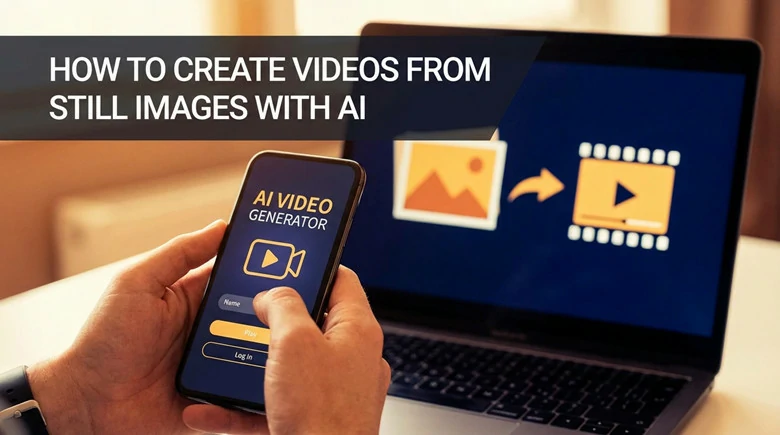
AI Video Generator from Image
The Best AI Video Generator from Image Online
Looking for an AI video generator to turn your photos into videos? FlexClip, an online image-to-video tool powered by AI, is a great option to explore.
First, it offers creative and versatile capabilities: whether you want to turn a single image into a video based on text prompts, animate a photo with 3D effects, or create an engaging slideshow from multiple images, FlexClip makes it easy without any experience required.
In addition, it enhances creativity by giving you access to a range of advanced generation models, including Kling, Google Veo 3, Seedance 1.5 Pro, Sora 2, Gork, Hailuo, and more, allowing you to experiment with different styles and results. For further refinement, a built-in video editor packed with rich features and resources is available to help you customize your video with ease.
Ready to get started? Follow the step-by-step guide below to dive in!
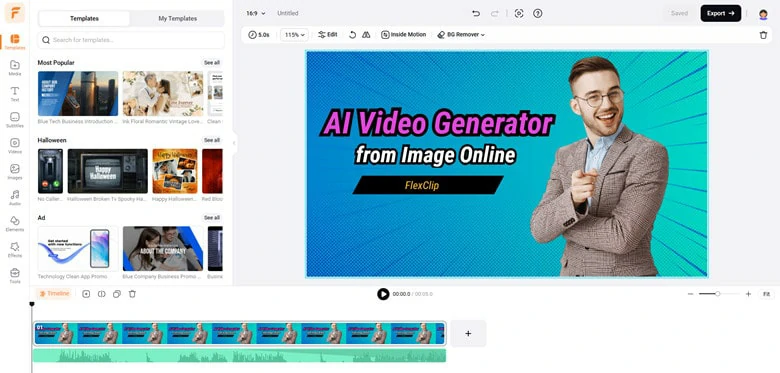
AI Photo to Video Generator FlexClip


How to Convert Still Image into Dynamic Video Using FlexClip
1)Convert Image into Video Using FlexClip's AI Image-to-video Generator
The first way to turn still image into a creative, dynamic video is using FlexClip's AI image-to-video generator. It offers multiple models to animate your portrait, pet meme, group photo and other pictures in high-quality either with a text prompt or not. This way gives you full control of the video animation, audio element and storytelling. Here's how to make it:
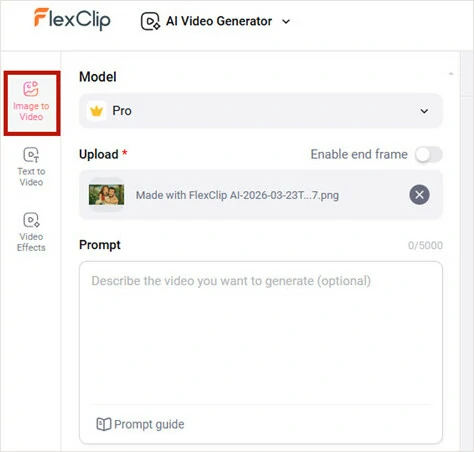
Go to FlexClip's AI Image-to-video Generator and Upload Image
Kling Motion-control Model: It's an advanced model that helps you transfer specific movements, gestures and expressions from a reference video onto a static image. It replicates complex actions well and maintains the background music, making it suitable for dancing, walking and other clips for consistent and high-fidelity AI video creation.
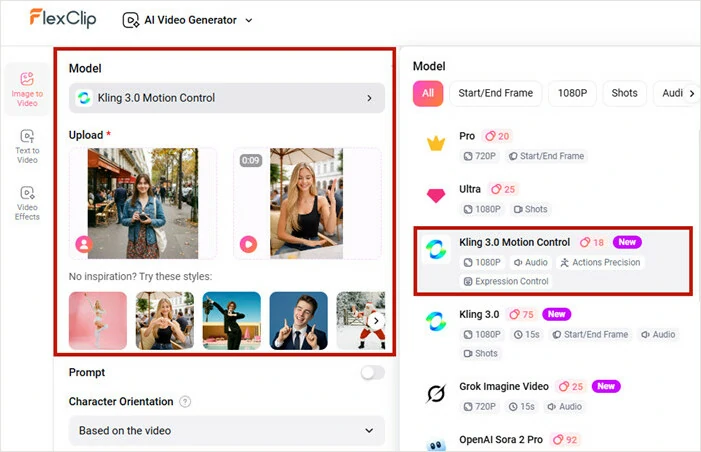
Generate Video from Image with FlexClip's Kling Motion-Control Mode
Start and End Frame Mode: This isn’t a specific generation model, but a creative approach that produces smooth videos by defining the exact start and end frames, with AI generating the motion in between. It’s a great option for creating effects like face morphing, AI aging, seasonal transitions, and other morphing or transformation-style videos.
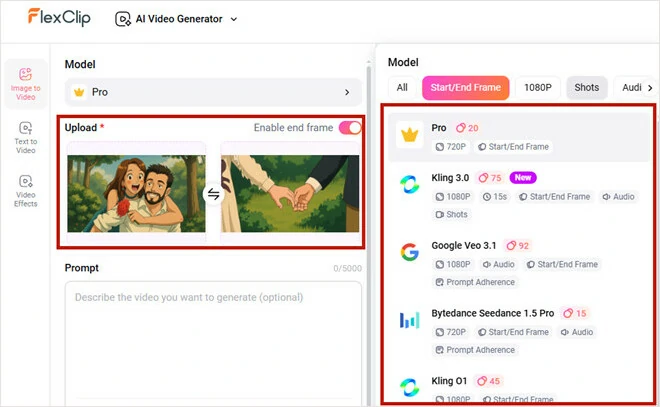
Generate Video from Image with FlexClip's Start and End Frame Approach
Subject Reference Mode: This is another creative way to produce smooth videos from multiple images. This mode analyzes each picture and generates a cohesive video that incorporates elements from all your references. This works best if you want to create a video with mixed images.
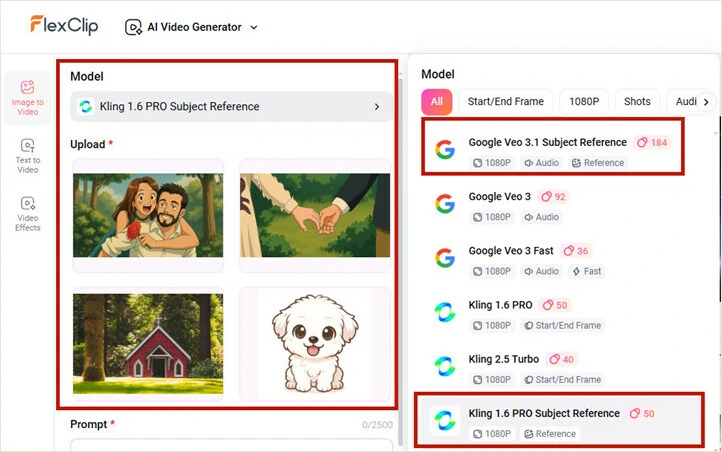
Generate Video from Image with FlexClip's Subject Reference Way
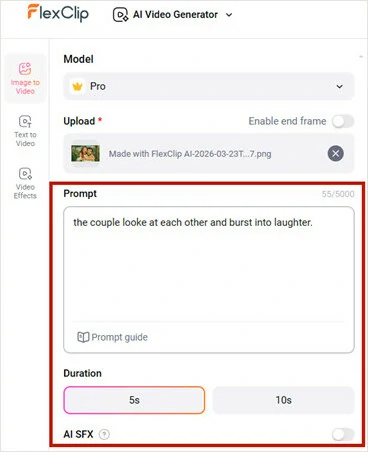
Adjust Settings to Generate Your Video
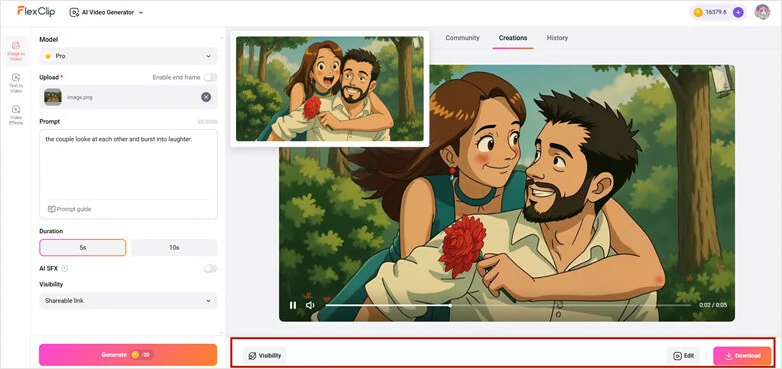
Transform the Image to Video as the Written Prompts
Bonus Tips: Go ahead to FlexClip's Video Effects and quickly animate your picture with presets like kissing, hugging, 360 degree rotation, crushing and more. Just upload picture and select an effect to apply, then AI will take care of the rest!
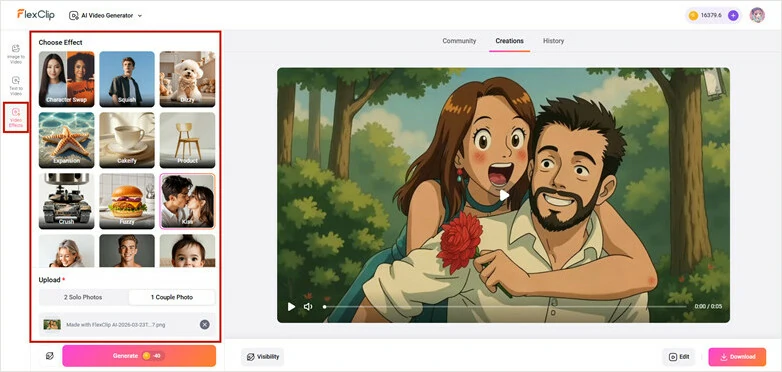
Animate Pictures with FlexClip Video Effects Library
2)Transform Image into Videos with AI 3D Animation
Make your static move as the real camera movement animation! FlexClip's AI 3D animation uses advanced AI technology to analyze your original image and apply stunning 3D effects of your photo while giving you full control over the style of 3D motion effect you like.
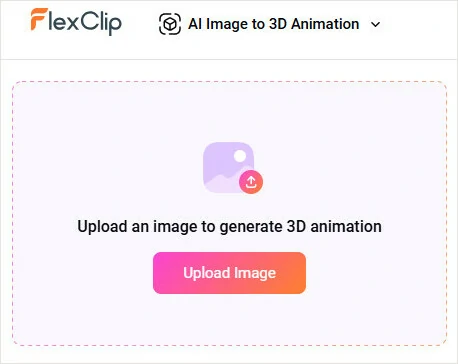
Access FlexClip's AI 3D Animation Tool and Upload Your Image
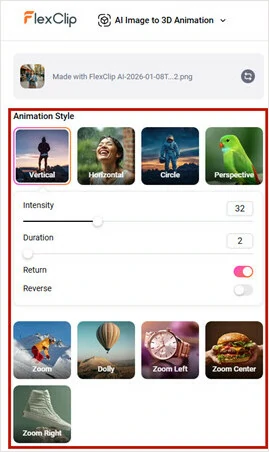
Choose the Animation Style You Like
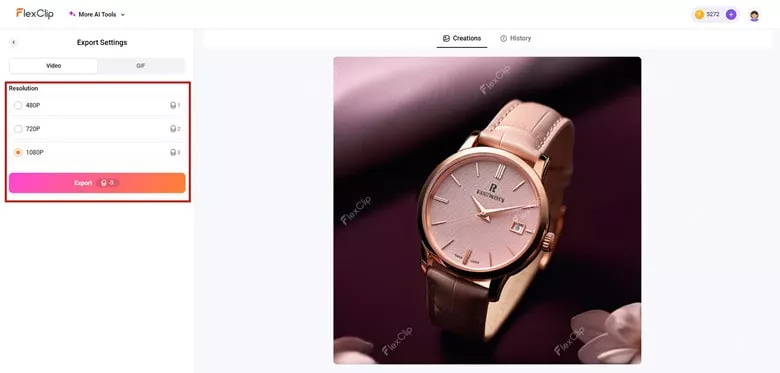
Preview the Animation Effect and Export it as a Video
3)Generate a Slideshow Video from Multiple Pictures with FlexClip's Auto Edit
WWant to create a slideshow-style video using a series of travel, birthday, wedding, or other themed photos? FlexClip's Auto Edit tool is ready to help! Just drag and drop your files and AI will detect, analyze and generate a ready-to-share slideshow video tailored to your content and theme—combined with background music, text, and stylish designs to produce the final result. Follow our step-by-step guide to give it a try!
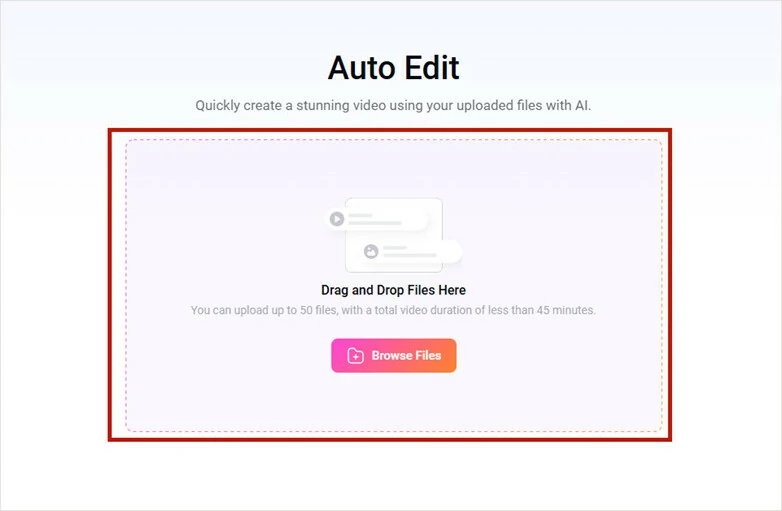
Upload Your Photos to FlexClip
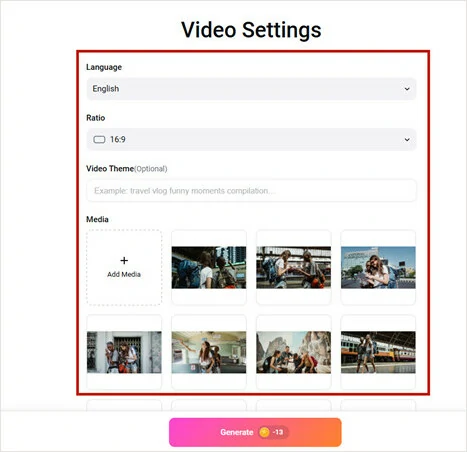
Make Video Settings of the Aut Edit Process
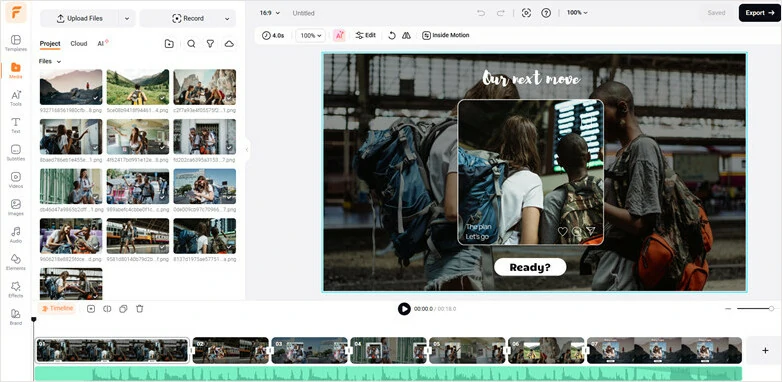
Preview and Edit Your Slideshow-style Video in FlexClip
Creative Video Cases You Can Generate with AI Image-to-video Tool
Looking for some inspiration to sparkle? Here are some trending yet creative videos you can generate with FlexClip's AI image-to-video tool.
Want to appear in the same frame as your idol? Whether it’s a chance street encounter or a visit on set, FlexClip's AI image-to-video generator can help you make it happen with ease.
AI Selfie with Celebrity Video Generated by FlexClip
20 years in 2 minutes using FlexClip! Use FlexClip’s AI video generator as a time machine to visualize your look and then animate still pictures into a video to show smooth age transformation.
Age Timelapse Video
Whether you want to showcase a day-to-night transition or a captivating season change frame by frame, FlexClip makes it easy. With FlexClip’s AI image-to-video generator, you can generate scenes from different times or seasons using a single image, then animate them into a smooth, seamless video.
Season Change Video Generated by FlexClip"
Frequently Asked Questions
1.What types of images work best?
High-resolution, well-lit images are the best. Always upload clear pictures with solid backgrounds than transparent ones, though an AI video generator from image can handle the both.
2.Can I control the animation?
Yes. In FlexClip, you can fine-tune every detail of your generated video—from the opening frame to the final scene—by adjusting prompts, including camera movements, lighting changes, character expressions, and more.
3.Do the generated video include a sound?
Yes. Some advanced generation model options in FlexClip, like Google Veo 3, Kling 3.0, OpenAI Sora 2 and Gork Imagine AI, can generate synchronized audio tracks, including background noise and ambient sound based on the visual content.
4.Can I edit and customize the video further?
Yes. FlexClip includes a built-in video editor for further customization, allowing you to add text to convey your message, adjust speed for special effects, apply filters for an aesthetic look, and more.
5.Can I use the videos for commercial purposes?
Yes. Every video generated from FlexClip can be used for both commercial and personal purpose as long as you’ve subscribed.




FlexClip AI Video Maker
Reach professional-quality videos faster with easy editing tools, templates, and smart AI.
Start Now for Free
Hot & Trending
-

Best Ways to Find Music in YouTube Videos
-

Instagram Story Video Quality Bad After Upload? Fix It!
-

How to Repost Video on TikTok & How to Remove TikTok Repost
-

Improve Video Quality Online: 3 AI Video Quality Enhancers You Can't Miss
-

4K Convert to HD 1080p without Watermark: Best 4k Video Converters
-

Best 8 Free Video Editors - No Download Required
-

Top 13 Birthday Video Makers with Music and Effects Free
-

How to Search Filters on TikTok & Use a Filter You See - TikTok Filter Guide