If you are on this page, you probably run into the situation that Instagram Story is not showing views. Although in most cases, the data may show up after a long while, while some other times, it just doesn't. Although this problem might seem common these days, Meta's explanation of why it persists is still unclear; many believe that it is a server-side problem.
As annoying as this situation can be, there is a solution; all you need to do is follow the procedures, and we have done just that for you. Below, we have listed simple steps you need to take to solve the Instagram story views not showing errors. Check them out.



Can't Miss: How to Fix Instagram Something Went Wrong Error >
Reasons Why You Can't See Instagram Story Views
Before the troubleshooting steps, please be aware that Instagram Story has some technical limitations for showing views. And they are the most significant reasons of Instagram Story views not showing issues.
1. Story Expired
Instagram Story expires after 24 hours. After expiration or removing the Instagram Story to highlights, you can reiew viewers for a short period of time, but it will not keep the viewer names indefinitely. Then all view data will disappear as the your Instagram Story.
2. Anonymous Viewing Tools
When someone uses external, anonymous third-party apps or websites to watch stories, Instagram can't collect viewing data from them. But it is rare to happen.
3. Privacy Settings
If you recently changed your account from professional to personal, or have strict privacy settings, it may affect viewer visibility.
How to Fix Instagram Story Views Not Showing Issues
1. Restart Your Phone
The thing is, sometimes, the Instagram app does experience some slight glitches. This often happens when the app runs for too long none stop. So, in this case, it needs a reboot hence, the idea of restarting your phone.

Restart Your Phone
2. Relaunch Instagram App
This looks similar to the method above, but you just have to cancel the app and relaunch it here.
3. Clear Instagram Cache
This can also happen when the cache is building up in the phone memory; you will have to close the app, clear the cache, and relaunch. To clear the cache, go to the Settings section of your device, click on storage, click on "App," search for the Instagram app and click, click "clear cache," and you are done. Note this process may differ according to the device in use.
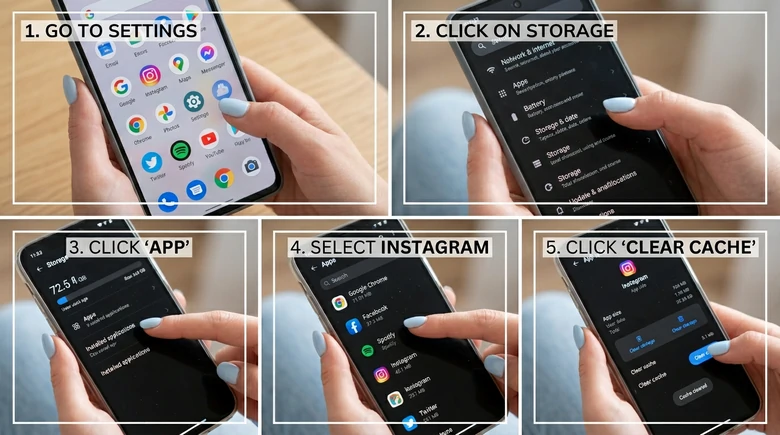
Clear Instagram Cache
4. Remove Instagram App and Redownload
This is a more extreme measure. Just uninstall your Instagram app, re-download it all over again and start afresh.
5. Use Instagram Web
Most cases of Instagram not showing story views are often experienced on the app section of Instagram. So, in this case, it is recommended that you use the website version – it is always efficient unless you have bad Internet.
6. Contact Instagram Support Team
You might as well contact the Instagram Support Team for assistance. But that will be after you must have tried out those methods mentioned above.
The Bottom Line
The thing is, there are many reasons why your Instagram app may be having the Instagram story not showing views problem. Although the root cause is not certain, the methods used in resolving it are very effective. With this, we urge you to like and share this article for the sake of those encountering this problem.




FlexClip AI Video Maker
Reach professional-quality videos faster with easy editing tools, templates, and smart AI.
Start Now for Free
Hot & Trending
-

Best Ways to Find Music in YouTube Videos
-

Instagram Story Video Quality Bad After Upload? Fix It!
-

How to Repost Video on TikTok & How to Remove TikTok Repost
-

Improve Video Quality Online: 3 AI Video Quality Enhancers You Can't Miss
-

4K Convert to HD 1080p without Watermark: Best 4k Video Converters
-

Best 8 Free Video Editors - No Download Required
-

Top 13 Birthday Video Makers with Music and Effects Free
-

How to Search Filters on TikTok & Use a Filter You See - TikTok Filter Guide